
If your tracks are registered with a Performance Rights Organization (P.R.O.) or Content ID administrator, you can add this information to your Motionstyles account. This ensures your tracks display the correct registration status to buyers.
Why Add Your PRO Organizations?
When buyers browse music on Motionstyles, they see each track's P.R.O. and Content ID status. Adding your affiliates helps:
- Inform buyers about potential cue sheet requirements or Content ID claims
- Streamline claim clearances when buyers submit requests
- Build trust through transparency about your music's registration
How to Add Your Organizations
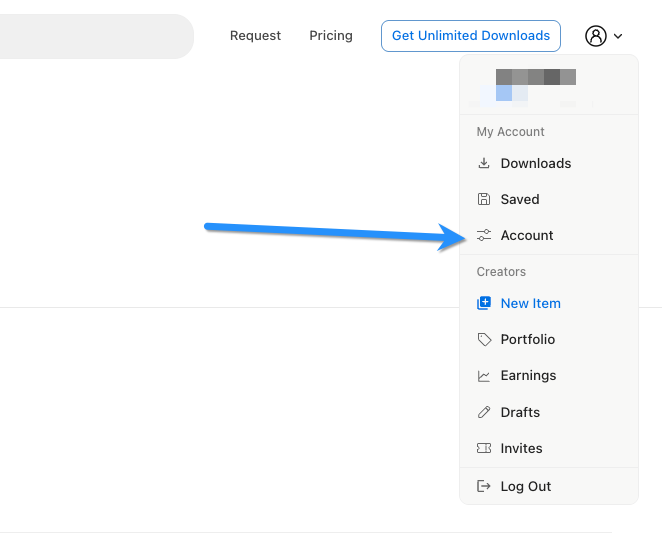
- Click your profile dropdown in the top-right corner
- Select Account
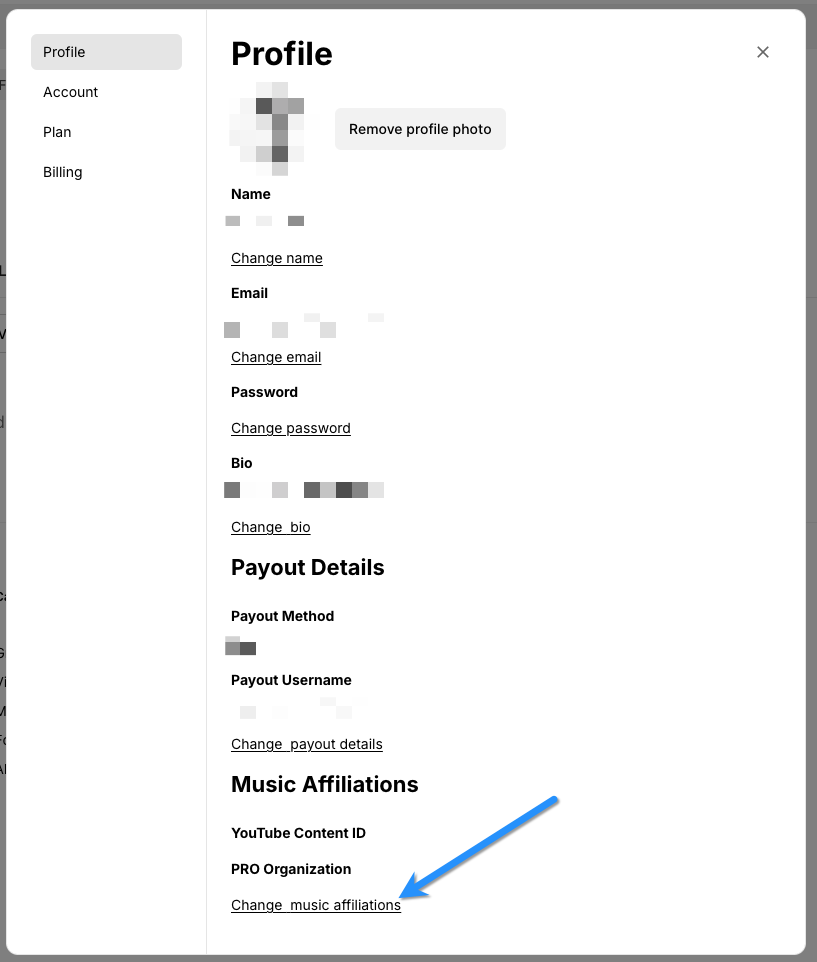
- Scroll to the Music Affiliates section at the bottom
- Select your P.R.O. from the dropdown (ASCAP, BMI, SESAC, PRS, SOCAN, GEMA, etc.)
- Select your Content ID administrator from the dropdown (Audiam, DistroKid, HAAWK, TuneCore, etc.)
- Save your changes
Notes
- If your music is not registered with a P.R.O. or Content ID system, leave those fields blank
- Your affiliate selections apply as defaults—you can override these on individual tracks if needed
- If your administrator isn't listed, contact us at [email protected]